I’ve spent the last couple of years talking to B2B marketing teams about their social media stack, and SocialPilot comes up quite a lot. It’s not hard to see why. The price is hard to argue with, and it covers the networks most teams need. But the same complaints surface every time. Analytics don’t match what LinkedIn actually shows. Pricing tiers punish you for growing. Posts fail without telling you. It’s a tool that covers 10 social media networks, but none of them deeply.
This article is for the marketing leader who has outgrown SocialPilot or is wondering whether they will. I’ve reviewed eight alternatives, from enterprise platforms to focused single-purpose tools, and laid out what each one does better, what it does worse, and which of SocialPilot’s five most common complaints it truly fixes.
What SocialPilot Is Genuinely Good At (and Why So Many Businesses Use It)
Most businesses choose SocialPilot because they’re tired of logging into 10 different platforms. “As someone managing six of my own social media platforms and another dozen or so for a client, SocialPilot has been an absolute game-changer,” says a G2 user. “It's hands down the easiest and most efficient way I've found to schedule and manage content across multiple platforms, with tailored formatting for each one.”
People also love how fast they can get started, as there’s little learning curve. You don’t need to be a social media expert. “I am not social media literate, but I needed to setup and manage social media accounts for my business,” notes a G2 reviewer.
Price is another pillar, with plenty of customers praising the cost, often in comparison to Hootsuite. “The cost was WAY less than Hootsuite," says one reviewer.
Publishing reliability also shows up as a top strength. And support is also overwhelmingly praised. For agencies, there’s one feature that justifies the subscription on its own. You can onboard clients with no password exchange. You invite clients to approve and review content without handing over credentials.
What SocialPilot Users Complain About Most
Many complaints about SocialPilot are scattered and specific. They're overwhelmingly centered around a particular thing missing, or not working as expected, rather than a problem with the product as a whole. That means the problem is fit, not quality. Here are the five issues that showed up most often.
1. Analytics and reporting you can't fully trust
Many users praise analytics, but in hedged language like “basic but impactful,” or “doesn't cover everything.” The failures fall into four buckets including depth, customization, coverage gaps, and most damaging, accuracy.
“The only complaint we have about the tool would be the analytics function," says a G2 user. “It doesn't always match the source and we find the results skewed. We also often can't get all of the data we are looking for through the tool and have to go to the source anyway.”
Accuracy issues go beyond mismatched numbers. “The dates of content posted being inaccurate and always a day behind the actual post date,” notes another G2 reviewer. “There is also the problem of not being able to see the difference between a sponsored post and an organic post on the analytic page; it only shows organic.”
Coverage gaps force users back into the source platforms anyway. “It would be awesome to be able to have an overview dashboard where I can see the analytics/Insights for all of my accounts at once, instead of having to go into each account,” a customer mentions.
2. Pricing structure and feature gating
Nobody says SocialPilot is expensive. They say the pricing structure punishes them. Analytics and the Social Inbox are absent from the $30 Essentials tier entirely. Bulk scheduling is a homepage headline feature that costs $100 per month to reach. Client seats start at Premium. Advanced white label is Ultimate-only. SSO and API access are Enterprise-only.
“One thing that stands out as a downside is the need to constantly upgrade your subscription to access platform-specific features,” says a G2 user, “like tagging or using the collab tool on Instagram. If the platform offers publishing to these networks, it would make sense for those key features to be included in the base subscription.”
The difference between tiers is also a real pain. “My biggest hurdle is keeping costs low while offering great service to my clients,” notes a reviewer, “and the next price jump is prohibitively expensive for my business right now.”
3. No bulk editing, every post touched individually
SocialPilot lets you bulk create up to 500 posts by CSV, but reviewers describe being unable to bulk modify. Because a multi-network post becomes separate per-platform entries, rescheduling one campaign means opening every copy.
“You do not have the option to just remove all of the post that are set by socialpilot monthly at one time, you have to remove them individually," says a G2 user.
"I would like to be able to add certain features on mass to all posts but this requires me to do it on each one individually at the moment," notes a G2 reviewer. "So having a feature for certain tags or links that I can mass add would be great."
"If I want to reschedule the date of a specific campaign, I need to click on each individual platform post," a customer mentions. "You can't reschedule as bulk."
SocialPilot shipped a Bulk Edit feature in March 2026 that lets you edit up to 30 scheduled social media posts at once. It is a real improvement, but the cap means larger campaigns still require multiple rounds of manual work, and the feature doesn’t address rescheduling across platforms in a single action.
4. Posts that fail silently
This one needs context: 19 reviewers praise publishing reliability. Both things are true. The issue is not that SocialPilot is unreliable. It is that when a post does fail, the alerting is poor, which breaks the set-and-forget promise the product is bought for.
“There are occasions where a post or two don't post with no real reason why not,” complains a user. “So you do need to check daily to make sure everything was posted.”
A couple other customers report similar problems. One says, “When a scheduled post generates an error, I don't get immediate notifications. Usually, I'm alerted a few hours after the post was supposed to go live.”
“I wish there was a way to alert the user that there would be errors to the post prior to it attempting to post,” a third customer mentions, “so that we wouldn't have errors popping up while we are not in the office.”
5. It does the essentials, and that’s the ceiling
One review captures SocialPilot’s market position more precisely than any feature list could. “Hootsuite offers much more detailed reporting and does not need a mobile device to publish certain Instagram posts,” says a G2 user. “It would also be useful to have a listening dashboard like Hootsuite. Hootsuite does everything whereas Social Pilot does the essentials.”
“Reporting customisation is somewhat limited compared to larger enterprise tools,” notes another customer.
That’s the ceiling. SocialPilot does the essentials well. The question is whether the essentials are enough for what you need, and I’ll help you answer that in the rest of this article.
What a Good SocialPilot Alternative Actually Needs
Most of SocialPilot’s friction points are the natural cost of a broad, multi-network tool priced for agencies. The right alternative depends on which limit you hit and what you’re willing to trade. These eight criteria come from the complaints above and from what you’d lose by leaving:
- Analytics that match the source platform: If the numbers in your tool don’t match the native app, every decision you make from them is compromised.
- Bulk editing, not just bulk creating: Rescheduling a campaign shouldn't be a per-post job.
- Pricing that doesn't gate the core job: No cliff between tiers where the price doubles but the value barely moves.
- Proactive failure alerts: Tell me before or at the moment a post fails, not hours later.
- Approval depth matching your stakeholder count: One approver versus brand plus legal plus client are different products.
- Client access without password exchange: SocialPilot’s best trait, and any alternative should match it.
- The surfaces you actually publish to, at real depth: A tool covering 10 networks will be shallower on each than one covering one.
- A path from posting to pipeline: If you're measured on revenue, UTM tags into Google Analytics is not a measurement system.
8 SocialPilot Competitors at a Glance
Here’s how all eight tools stack up against SocialPilot's five most common complaints, side by side.
| Tool | Best for | Main complaint it fixes | Official LinkedIn API | Entry price | Free tier |
|---|---|---|---|---|---|
| Scripe | B2B teams whose LinkedIn results come from their people | Doing only the essentials | ✅ | €69/mo | Free trial |
| Sprout Social | Teams that need listening, paid and organic, and CRM | Analytics and reporting depth | ✅ | $79/seat/mo | Free trial |
| Hootsuite | Integration breadth across 100-plus tools | Analytics and reporting depth | ✅ | €99/user/mo | Free trial |
| Metricool | Analytics depth and competitor tracking on a budget | Analytics and reporting depth | ✅ | Free (paid from €16/mo) | Yes (no LinkedIn or X) |
| Planable | Multi-stakeholder approval depth | Doing only the essentials | ✅ | $39/mo/workspace | 50 free posts |
| Agorapulse | Teams where the inbox is the bottleneck | Doing only the essentials | ✅ | €99/user/mo | Free trial |
| Buffer | Simplicity and a real free tier | Pricing structure | ✅ | Paid from $6/channel/mo | Yes (3 channels) |
| OneUp | Local and multi-location businesses | Pricing structure | ✅ | $25/mo | Free trial |
#1 Scripe: Best for B2B Teams Whose LinkedIn Results Come From Their People
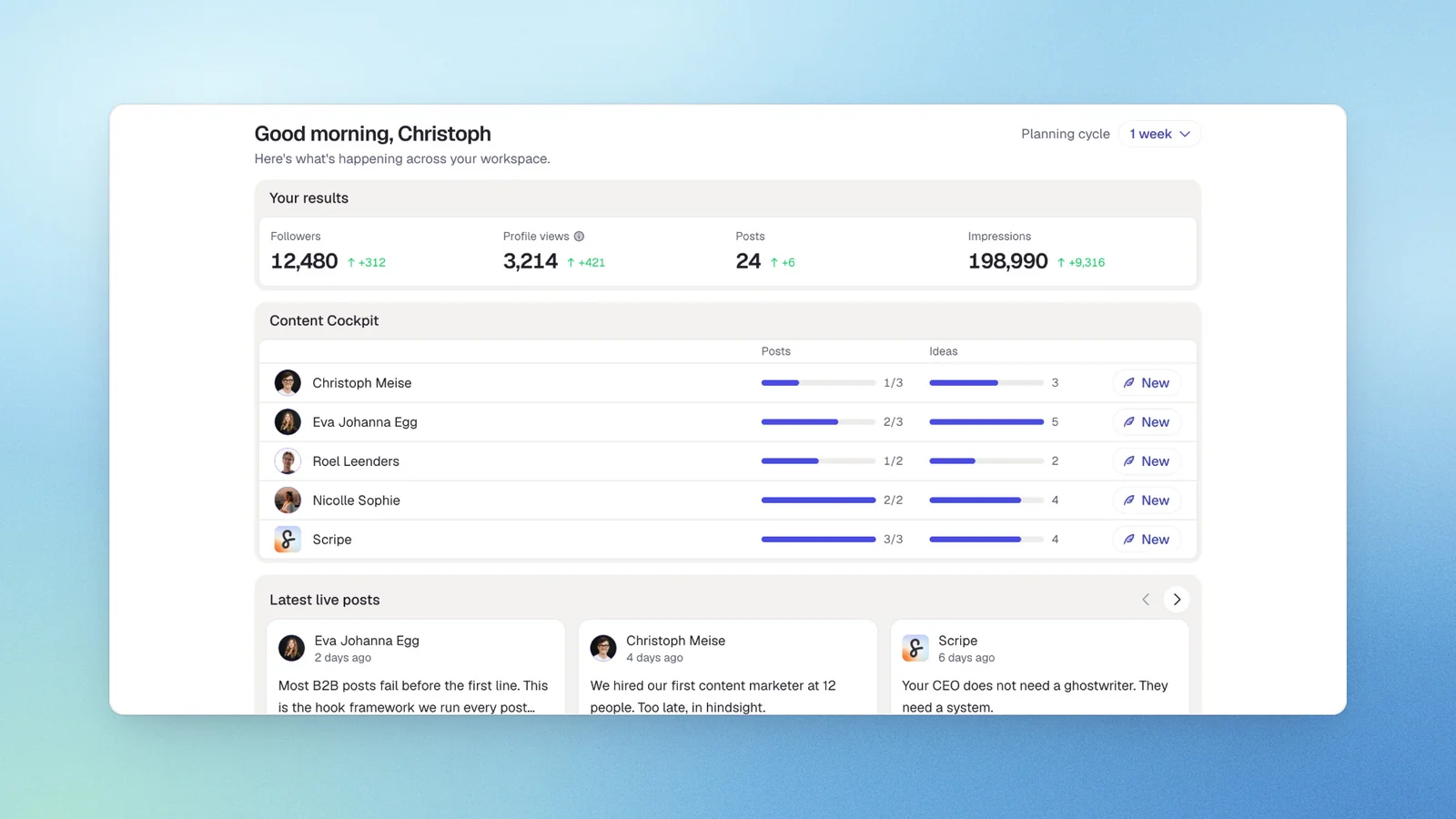
I built Scripe because I kept seeing the same gap in every B2B marketing team I worked with. The people who generate the best LinkedIn content are rarely the ones writing it. Founders, engineers, sales leaders, subject matter experts. They carry the knowledge that makes a post worth reading, but the distance between what they know and what actually gets published is enormous. Most tools treat that gap as a scheduling problem. It’s not, though. It is a content creation problem.
Scripe starts from the person, not the post. Each connected LinkedIn account gets its own voice profile, its own knowledge base, and its own content strategy. Our AI learns from your best-performing work and generates drafts that sound like you. It’s not a shared prompt drawing from a pooled credit allowance. That’s the structural difference from SocialPilot, where 50 connected accounts share one generic AI voice and LinkedIn is one of 10 networks competing for depth.
Key features
- Personalized content strategy per person: Each account gets its own audience targets, topics, and writing style
- AI content creation from multiple inputs: Voice memos, text, video, and YouTube links convert into finished posts, plus structured content interviews turn spoken expertise into publishable drafts
- Tone-of-voice engine: The system learns from each person’s best-performing posts and refines over time, with a workspace-wide tone layer on Business for brand consistency
- Shared content calendar: Approval workflows, roles and permissions, and company page plus personal profiles live in one workspace
- Link tracking for revenue attribution: Available on Business, this is the direct answer to SocialPilot's structural gap between posting and pipeline
- Full LinkedIn analytics: Historical data, post-level performance, and separate organic versus company-page reach come standard
Official LinkedIn API: ✅
Scripe operates through LinkedIn’s Community Management API, the partnership tier LinkedIn reserves for approved developer partners.
Pricing
If paid monthly
- Solo: €69/mo (~$80,09)
- Advanced: €99/mo (~$114,91)
- Business: €149/mo (~$172,94)
If paid yearly
- Solo: €55/mo (~$63,84)
- Advanced: €79/mo (~$91,69)
- Business: €119/mo (~$138,12)
All plans include a 7-day free trial.
Who should pick Scripe over SocialPilot
- B2B companies running a founder-led or exec-led LinkedIn motion where each person needs their own voice and strategy rather than one shared AI credit pool
- Marketing teams running aiemployee advocacy who need per-person output plus team-level analytics and Amplifier seats
- B2B teams accountable for pipeline who need link-level attribution from LinkedIn, not just UTM tags in GA
- Agencies whose LinkedIn retainers depend on content quality and reporting per client, not on how many account slots the tool includes
When to choose another tool
- Anyone who needs Instagram, TikTok, Pinterest, Google Business Profile, or Threads since Scripe is LinkedIn-only
- Local and multi-location businesses whose channel is Google Business Profile plus reviews
Try Scripe for free
Start a Free Trial#2 Sprout Social: Best for Teams That Need Listening, Paid and Organic, and CRM
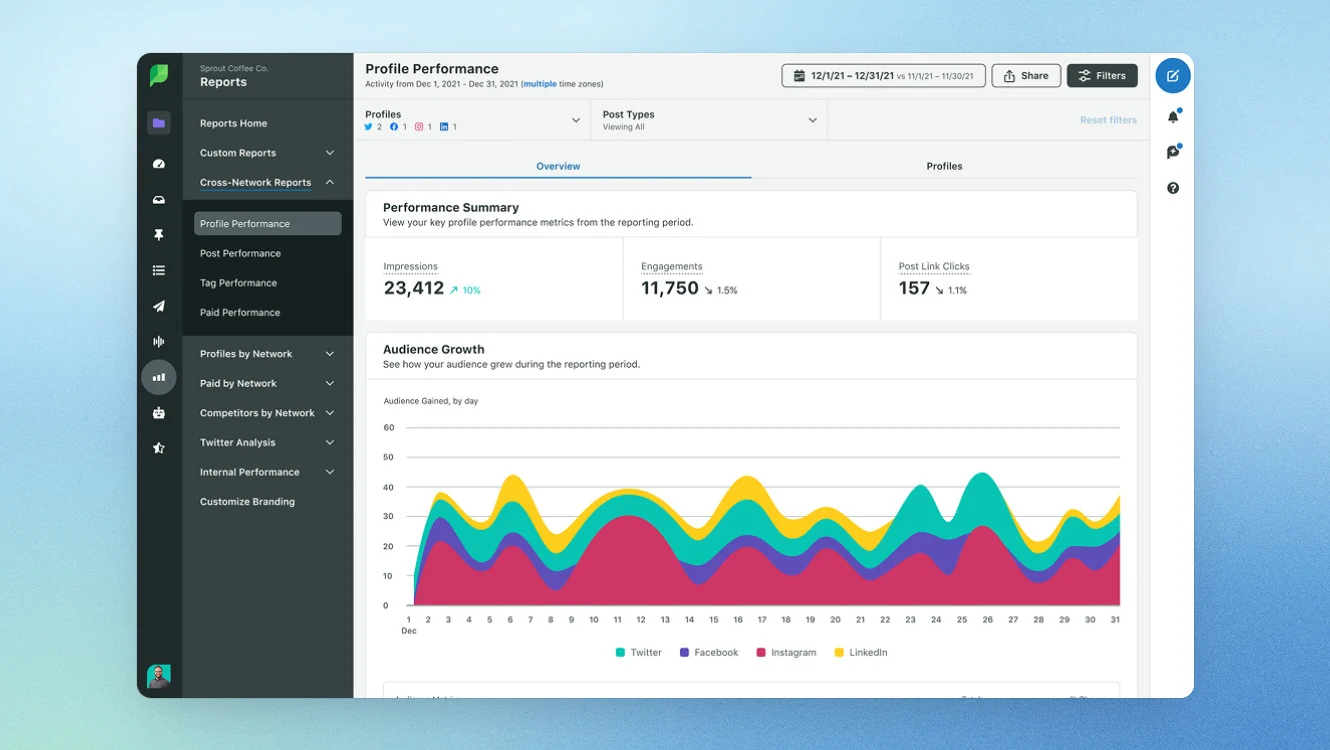
Sprout Social answers the three things SocialPilot structurally has none of: social listening, paid plus organic reporting, and bidirectional CRM integration with Salesforce, HubSpot, and Zendesk. The platform centers on an AI agent called Trellis that surfaces signals and recommends next steps across publishing, engagement, analytics, and advocacy.
Key features
- Publishing with multi-profile scheduling and optimized send times based on live signals
- Social listening across major channels, blogs, and forums with real-time monitoring, sentiment analysis, and spike alerts (as an add-on)
- Employee advocacy with curated on-brand content, UTM tracking, and earned media value calculation (as an add-on)
Official LinkedIn API: ✅
Sprout Social uses official LinkedIn connection, so your account is safe.
Pricing
All plans except “Essentials” are billed yearly.
- Essentials: $79/seat/mo (~€68,08/seat/mo)
- Standard: $199/seat/mo (~€171,48/seat/mo)
- Professional: $299/seat/mo (~€257,66/seat/mo)
- Advanced: $399/seat/mo (~€343,80/seat/mo)
- Enterprise: Custom
When to pick Sprout Social over SocialPilot
- Your complaint is analytics depth or accuracy and you need reporting that matches the source platform
- You need social listening, which SocialPilot does not offer at any tier
When to choose another tool
- Price is a deciding factor since Sprout starts at $199/seat/mo versus SocialPilot’s $30/mo entry
- You’re a small team that does not need enterprise-grade listening or CRM depth
#3 Hootsuite: Best for Integration Breadth
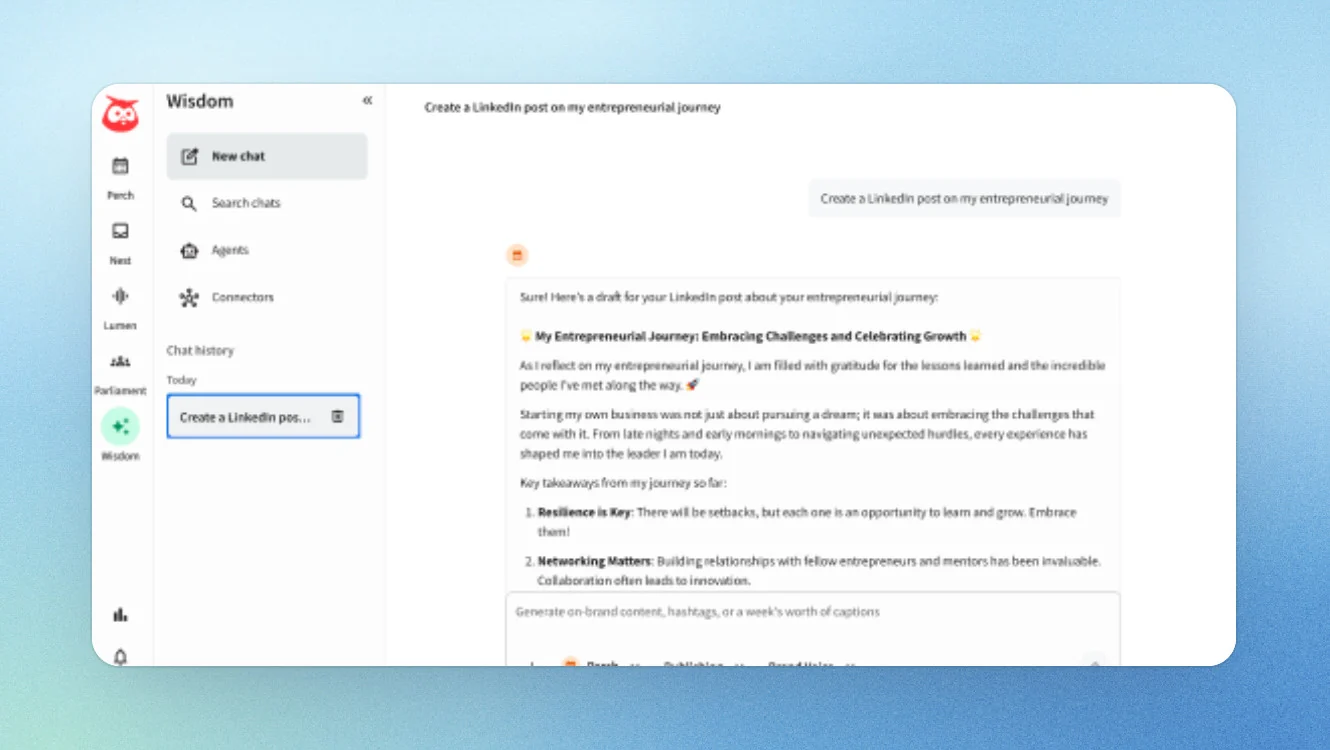
Hootsuite combines publishing, engagement, listening, analytics, and employee advocacy in one connected suite with 100-plus integrations. It’s also the tool SocialPilot users most often came from. It’s named multiple times in SocialPilot G2 reviews, where users prefer Hootsuite’s advanced capabilities over SocialPilot’s. Many readers left Hootsuite for SocialPilot over price, and the ones who outgrow SocialPilot’s ceiling end up considering it again.
Key features
- Unlimited social post scheduling with AI-generated posts and images plus best-time-to-post recommendations per network
- Unified inbox for private and public messages with saved replies, automated DMs, and team routing
- Social listening with brand and competitor monitoring, sentiment analysis, and advanced cross-channel listening on Enterprise
Official LinkedIn API: ✅
Hootsuite uses official LinkedIn connection, so your account is safe.
Pricing
- Standard: $99/user/mo (~€85,31)
- Professional: $199/user/mo (~€171,48)
- Advanced: $399/user/mo (~€343,83)
- Enterprise: Custom
When to pick Hootsuite over SocialPilot
- You need social listening, which SocialPilot lacks entirely
- You need broader network coverage and more publishing depth per network
When to choose another tool
- Price is the primary factor since SocialPilot starts at $30/mo versus Hootsuite’s €99/user/mo
- You are an agency that needs white-label reporting without enterprise pricing
#4 Metricool: Best for Analytics Depth and Competitor Tracking on a Small Budget
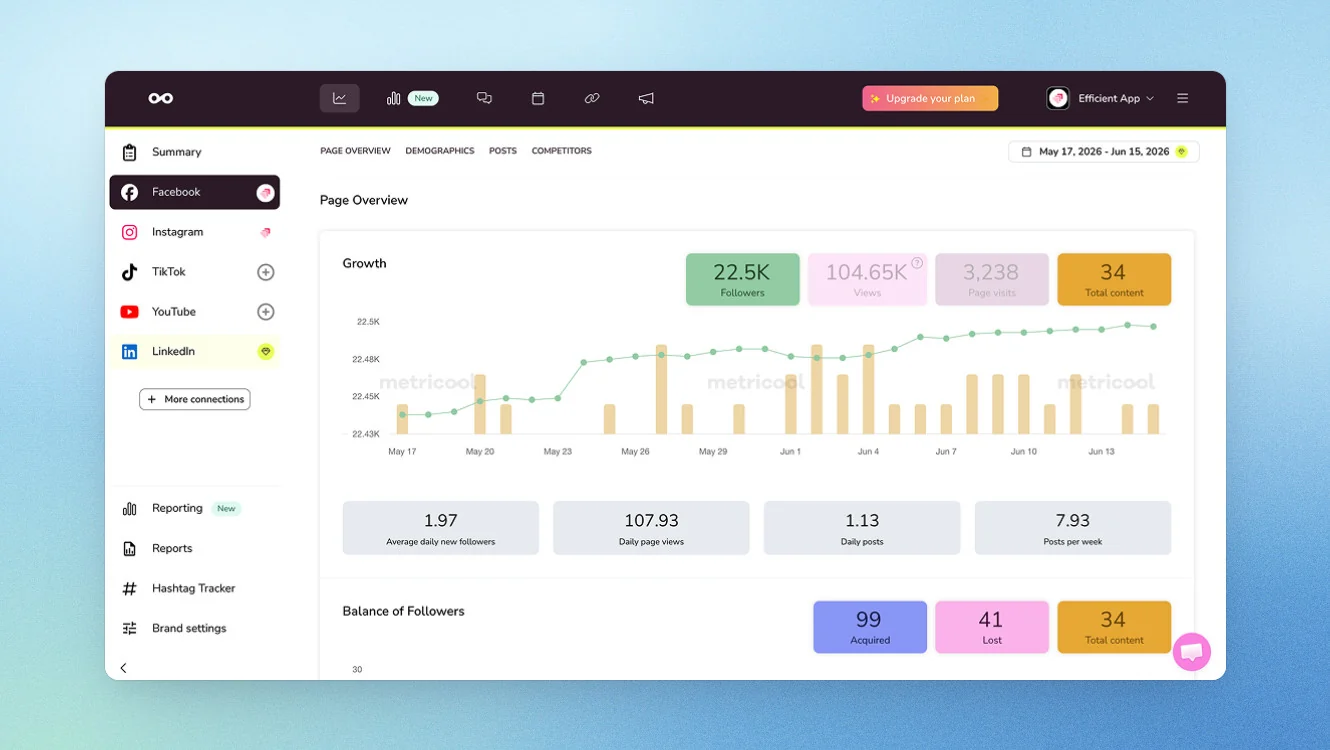
Metricool is the direct answer to one of SocialPilot’s largest complaints: analytics. It centralizes planning, scheduling, publishing, analytics, and reporting across multiple networks from a single dashboard. The analytics are deeper than SocialPilot's, with competitor tracking, a Looker Studio connector on higher tiers, and unlimited history on paid plans. Pricing scales by brand rather than by seat, which suits agencies and multi-location teams. But the free plan excludes LinkedIn and X entirely.
Key features
- Centralized analytics across Instagram, Facebook, TikTok, YouTube, X, Bluesky, LinkedIn, Pinterest, Google Business Profile, and Twitch
- Competitor tracking with real-time monitoring of competitor publications, follower growth, and post performance
- AI social media assistant for content ideas plus drag-and-drop calendar scheduling and automated content lists
Official LinkedIn API: ✅
Metricool uses official LinkedIn connection, so your account is safe.
Pricing
If paid monthly
- Free: but doesn’t include LinkedIn or X
- Started: €20/mo ($25)
- Advanced: €54/mo ($67)
- Custom
If paid yearly
- Free: but doesn’t include LinkedIn or X
- Started: €16/mo ($20)
- Advanced: €43/mo ($53)
- Custom
All plans include a 7-day free trial.
When to pick Metricool over SocialPilot
- Your complaint is analytics depth or accuracy and you need reporting that goes beyond basic metrics
- You want pricing that scales by brand rather than by seat
When to choose another tool
- You need LinkedIn on a free or low-cost plan since Metricool excludes it from the free tier
- You need white-label reporting on a mid-tier plan
#5 Planable: Best for Multi-Stakeholder Approval Depth
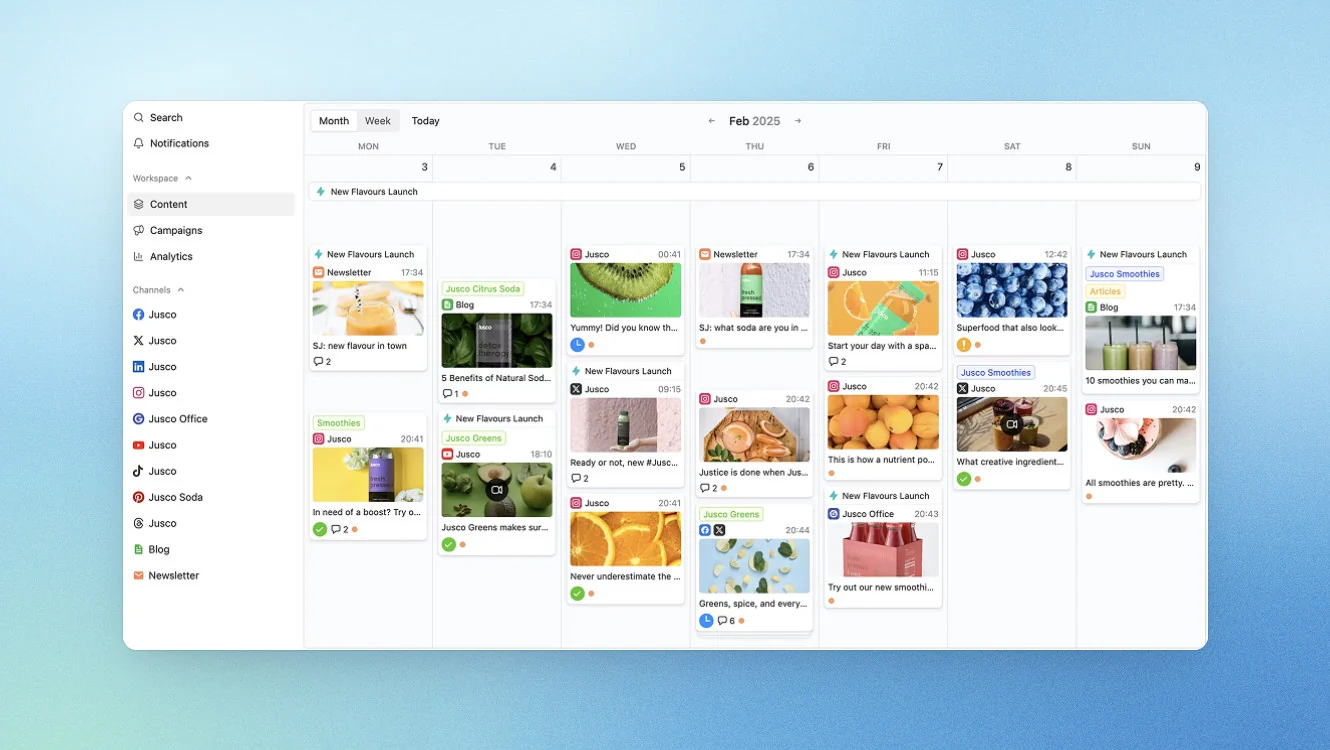
Planable is the strongest answer when more than one person needs to sign off on a post before it goes live. It’s a collaboration-first social media management tool built around approval workflows, in-context feedback, and visual previews that show exactly how a post will look when published. Planable features four approval modes including sequenced multi-level approvals where posts move through a chain of team lead, client, and legal before publishing.
Key features
- Four approval modes including None, Optional, Required, and multi-level sequenced approvals that stack steps in order
- Multiple content views including feed with post previews and inline feedback, calendar with rich previews, Instagram grid planner with drag-and-drop, and global overview for bulk actions across workspaces
- In-context feedback with comments, suggestions, and annotations linked directly to specific content
Official LinkedIn API: ✅
Planable uses official LinkedIn connection, so your account is safe.
Pricing
If paid monthly
- Basic: $39/mo (~€33,62)
- Pro: $59/mo (~€50,87)
- Custom
If paid yearly
- Basic: $33/mo (~€28,45)
- Pro: $49/mo (~€42,24)
- Custom
All plans include a free 50 posts.
When to pick Planable over SocialPilot
- Your complaint is approval depth and you need multi-level sequenced approvals with brand, legal, and client sign-off
- You want per-workspace pricing that scales with client count instead of per-seat pricing
When to choose another tool
- You need a Social Inbox since Planable's inbox is an add-on, not a core feature
- You want analytics included in the base price rather than as an add-on
#6 Agorapulse: Best for Teams Where the Inbox Is the Bottleneck
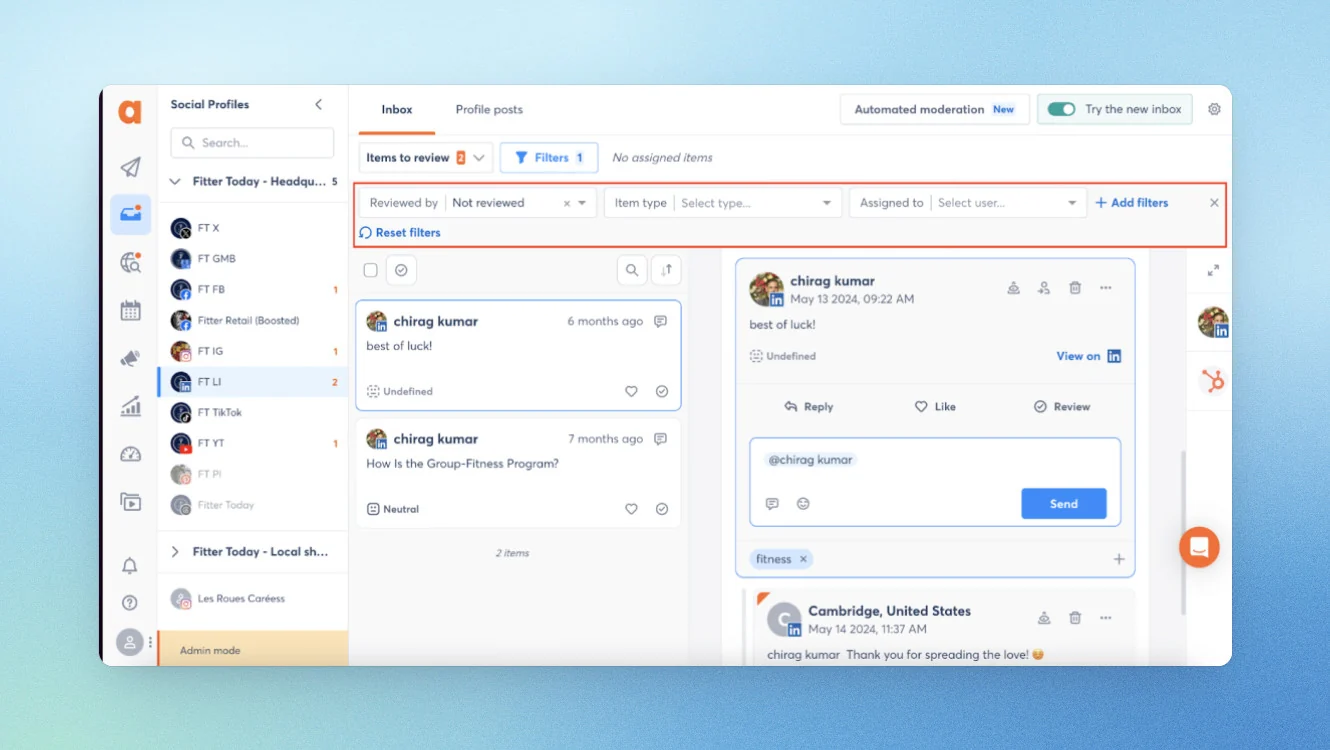
Agorapulse is the pick for teams drowning in comments, DMs, and reviews. SocialPilot’s Social Inbox covers only 4 of its 10 publishing networks and is absent from the Essentials tier entirely. Agorapulse has a unified inbox that handles all messages, DMs, comments, and reviews across networks.
Key features
- Unified inbox for all messages, DMs, comments, and reviews across networks with smart rules, triggers, and the ability to assign, hide, label, or delete items
- Publishing with unlimited post scheduling, shared calendars, and first comment plus threads scheduling on Instagram, Facebook, and LinkedIn
- Listening and monitoring for brand, industry, and competitor mentions across social networks, news sites, and blogs
Official LinkedIn API: ✅
Agorapulse uses official LinkedIn connection, so your account is safe.
Pricing
If paid monthly
- Standard: $99/mo (~€85,25)
- Professional: $149/mo (~€128,30)
- Advanced: $199/mo (~€171,35)
If paid yearly
- Standard: $79/mo (~€68,02)
- Professional: $119/mo (~€102,47)
- Advanced: $149/mo (~€128,30)
All plans include a 7-day free trial. Custom enterprise plans are available.
When to pick Agorapulse over SocialPilot
- Your complaint is the Social Inbox and you need a unified inbox that covers all networks with smart rules and assignment features
- You need social listening, which SocialPilot does not offer
When to choose another tool
- You need multiple social media accounts at a lower price point
- You need bulk scheduling via CSV at a lower tier
#7 Buffer: Best for Simplicity and a Real Free Tier
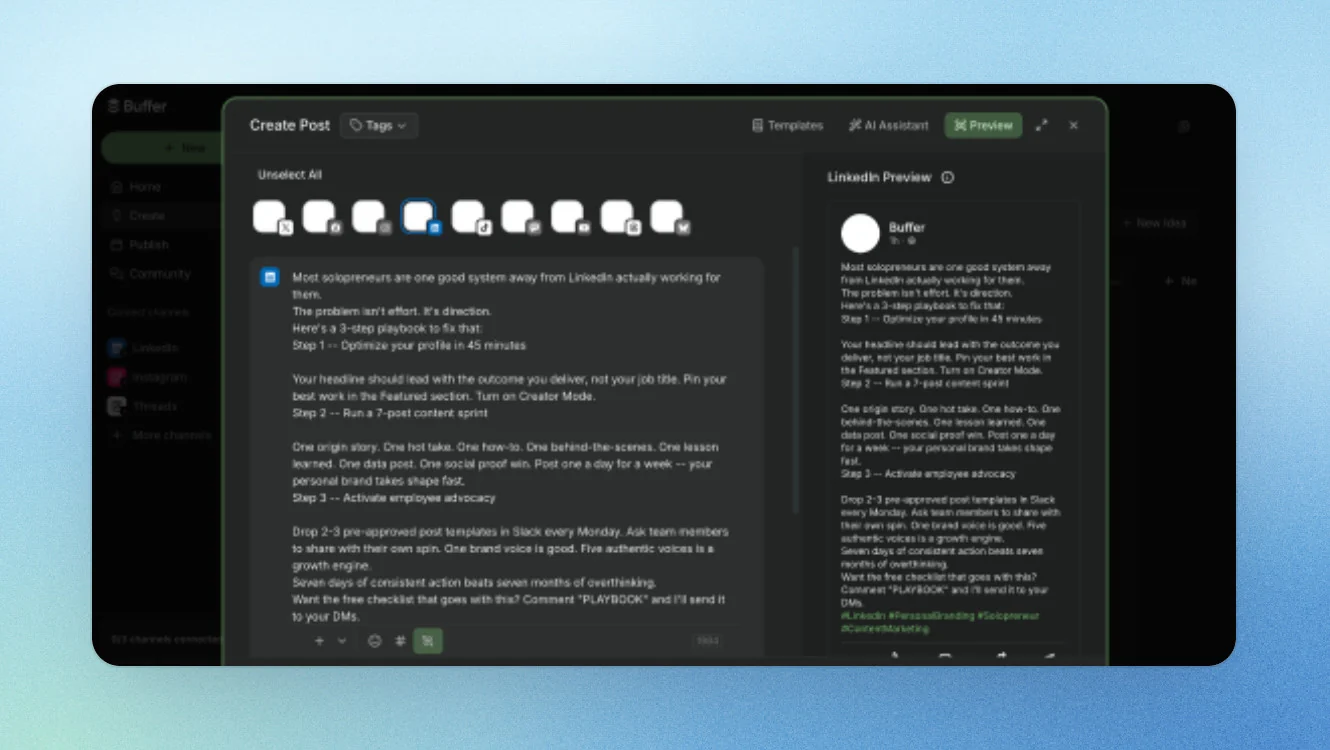
Buffer is the right answer for two of SocialPilot’s biggest personas: the solo in-house marketer and the accidental social manager who just needs posts to go out. It offers a free plan for three channels, the cleanest UI in the category, and per-channel pricing that rewards expansion rather than punishing it.
Key features
- Post scheduling across networks with calendar view and queue management
- Post-level performance analytics and audience insights through Buffer Insights
- Team collaboration with approval workflows and custom permissions on the Team plan
Official LinkedIn API: ✅
Buffer uses official LinkedIn connection, so your account is safe.
Pricing
If paid monthly
- Free: $0/mo (limited channels)
- Essentials: from $6/channel/mo (~€5,17)
- Team: from $12/channel/mo (~€10,35)
If paid yearlly
- Free: $0/mo (limited channels)
- Essentials: from $5/channel/mo (~€4,31)
- Team: from $10/channel/mo (~€8,62)
14-day free trial on paid plans.
When to pick Buffer over SocialPilot
- Your complaint is no free tier and you need a genuine free plan to start
- You want per-channel pricing that rewards channel expansion
When to choose another tool
- You need agency features like white-label reporting and client approvals
- You need a social inbox that handles DMs across networks, since Buffer's Community inbox is comments-focused
#8 OneUp: Best for Local and Multi-Location Businesses
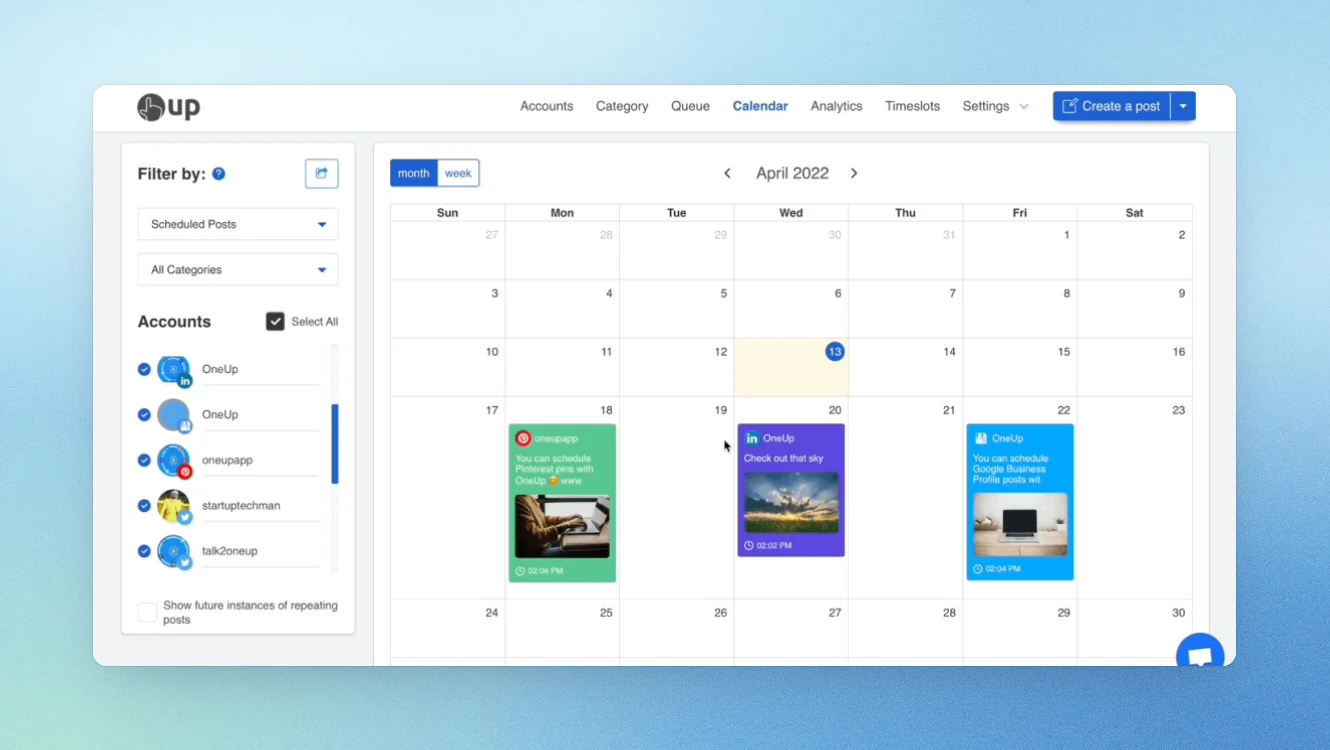
OneUp is great for businesses with multiple locations, which is one of SocialPilot's core audiences. SocialPilot’s homepage presents Reviews as a platform capability, but Reviews and Listings are a separately priced product starting at $25/mo with per-location scaling. OneUp includes Google Business Profile review replies with AI-suggested responses directly in the platform, no separate purchase required. It also supports Snapchat and Bluesky, which SocialPilot does not.
Key features
- Google Business Profile review replies with AI-generated responses directly in the platform
- Social inbox for replying to comments, DMs, and reviews with email alerts and saved reply shortcuts
- Social listening across YouTube, X, Bluesky, Instagram, and Reddit with keyword monitoring and email notifications
Official LinkedIn API: ✅
OneUp uses official LinkedIn connection, so your account is safe.
Pricing
If paid monthly
- Basic: $25/mo (~€21,55)
- Intermediate: $60/mo (~€51,72)
- Growth: from $120/channel/mo (~€103,45)
- Business: from $300/channel/mo (~€258,62)
- Custom
If paid yearlly
- Basic: $15/mo (~€12,93)
- Intermediate: $48/mo (~€41,38)
- Growth: from $84/channel/mo (~€72,42)
- Business: from $240/channel/mo (~€206,90)
- Custom
7-day free trial on paid plans.
When to pick OneUp over SocialPilot
- You need Google Business Profile review replies without buying a separate Reviews product
- You need Snapchat or Bluesky support, which SocialPilot does not offer
When to choose another tool
- You need more social accounts at a lower price point since SocialPilot's Essentials includes 7 accounts for $30/mo versus OneUp's $68/mo for 15
- You need white-label reporting, which OneUp does not offer
How To Choose the Right SocialPilot Alternative
I think one of the worst ways to pick a tool is by starting with the matrix. Start with the bottleneck instead. Name the one thing that breaks first when you scale, and the list narrows itself. These five questions do that work for you.
Does your growth come from the company page or from your people?
If it’s people, no scheduler on this list solves it. That’s a category decision, not a tool swap. You need per-person content creation, not a shared AI credit pool drawing from one generic voice.
What are you measured on, posting volume or pipeline?
If pipeline, you need attribution, and UTM tags into Google Analytics isn’t attribution. You need link-level tracking that connects a specific post to a specific outcome.
How many people sign off before a post is published?
One approver means almost anything works. Brand plus legal plus client means approval depth is your deciding criterion, and most tools on this list don’t go that deep.
Do clients log in, and must they not see your brand?
This decides whether white-label reporting is a must-have or a nice-to-have. If clients need a fully branded experience, collaboration-first tools won't cut it.
What’s your growth vector: accounts, channels, seats, clients, or locations?
This decides which pricing model punishes you, and which makes the most sense:
- Per-account (SocialPilot) rewards hoarding slots
- Per-channel (Buffer) punishes channel expansion
- Per-seat (Sprout, Agorapulse) punishes team growth
- Per-workspace (Planable) scales with clients
- Per-LinkedIn-account with unlimited users (Scripe) rewards adding people without paying for seats.
Why B2B Teams Choose Scripe
Company-page organic reach has been declining for years, and B2B buyers follow people, not brands. Distribution has moved to founder and employee profiles. Every marketing leader I talk to knows this. What they don’t have is a tool built around it. A platform that treats LinkedIn as one of 10 publishing destinations can’t operationalize per-person content. That’s the gap Scripe fills.
Each person gets their own voice profile, their own knowledge base, and their own content strategy. AI generates drafts that sound like them. Team analytics show you who’s performing and why. Link tracking on Business connects a specific post to a specific pipeline outcome.
Our customers prove it works. esentri turned their LinkedIn into a lead generation engine by giving every consultant a voice on the platform. Julia Butz at FoodVisions built a content system that scales across her team without losing personal authenticity. And ColdIQ replaced their manual LinkedIn workflow with a structured process that turns expertise into posts.
Here’s what I tell teams who ask. Keep a generalist tool for your volume networks. Run Scripe where the pipeline actually comes from. That split-stack approach works because the tools are solving different problems. SocialPilot moves posts. Scripe moves people.
Start a 7-day free trial of Scripe today.
FAQs

Co-Founder & CEO
Eva Johanna Egg is the co-founder and CEO of Scripe, where she helps individuals turn their genuine expertise into authentic, high-impact content. With nine years of hands-on social media building and academic grounding in engineering she brings a rare combination of practical platform experience and technical rigor to the personal branding space.
LinkedIn