Why people switch from Taplio
I spent time reading Taplio reviews across G2, Capterra, Reddit, and LinkedIn comment threads. The same three frustrations kept appearing.
Pricing that traps you in the middle
The $39 Starter plan includes zero AI credits — a meaningful problem for a product whose main selling point is AI content generation. Upgrading to Growth ($69/mo) unlocks AI, but limits you to 250 AI credits and 500 comment credits across every action: drafting posts, generating hooks, replying to comments. When those run out, the only path forward is the $199 Pro plan. That's a $130 jump with no intermediate option, no way to purchase additional credits, and no flexibility.
AI that doesn't sound like you
This is the most consistent complaint across every platform I checked. Taplio's AI produces recognizable, formulaic LinkedIn content — hooks that follow the same pattern, intros that open identically, conclusions that land the same way. Most users report spending as much time rewriting AI output as they would have spent writing from scratch. For a personal brand where your voice is the point, that negates most of the value.
Account safety concerns
Taplio uses cookie-based authentication and a Chrome extension. Some users report account warnings, reduced reach, or temporary restrictions they attribute to Taplio's automation features. Individual cases are impossible to verify, but the pattern appears consistently enough in review data that account safety is a genuine consideration. Every tool on this list takes a different architectural approach.
How I chose this list
I compared tools on seven criteria, in priority order.
- Official LinkedIn connection. Tools using cookie-based session access have been targeted by LinkedIn's enforcement actions. I prioritized official API partners and flagged where connection method differs.
- AI quality and personalization. A persistent voice profile trained on your past posts, not a blank prompt each session. I looked for Knowledge Base support, content ingestion from documents and URLs, and AI that improves the more you use it.
- Depth of LinkedIn operations. Does the tool go beyond scheduling? Content ideation, hook generation, carousel creation, analytics with actionable insight, team approval workflows — the more of the content lifecycle it covers, the less you're stitching together separate tools.
- Analytics depth. Post-level performance, follower growth, best posting times, content format breakdowns. For agencies: multi-account analytics in one view.
- Team collaboration. Approval workflows, shared calendars, role-based permissions, multi-account management from one dashboard.
- Pricing model. Does the entry plan include the tool's core feature (AI generation)? No credit ceilings, no sudden tier cliffs.
- Content sourcing and discovery. RSS feeds, news aggregation, viral post libraries, trending content discovery — anything that reduces the blank-page problem.
Quick comparison of Taplio alternatives
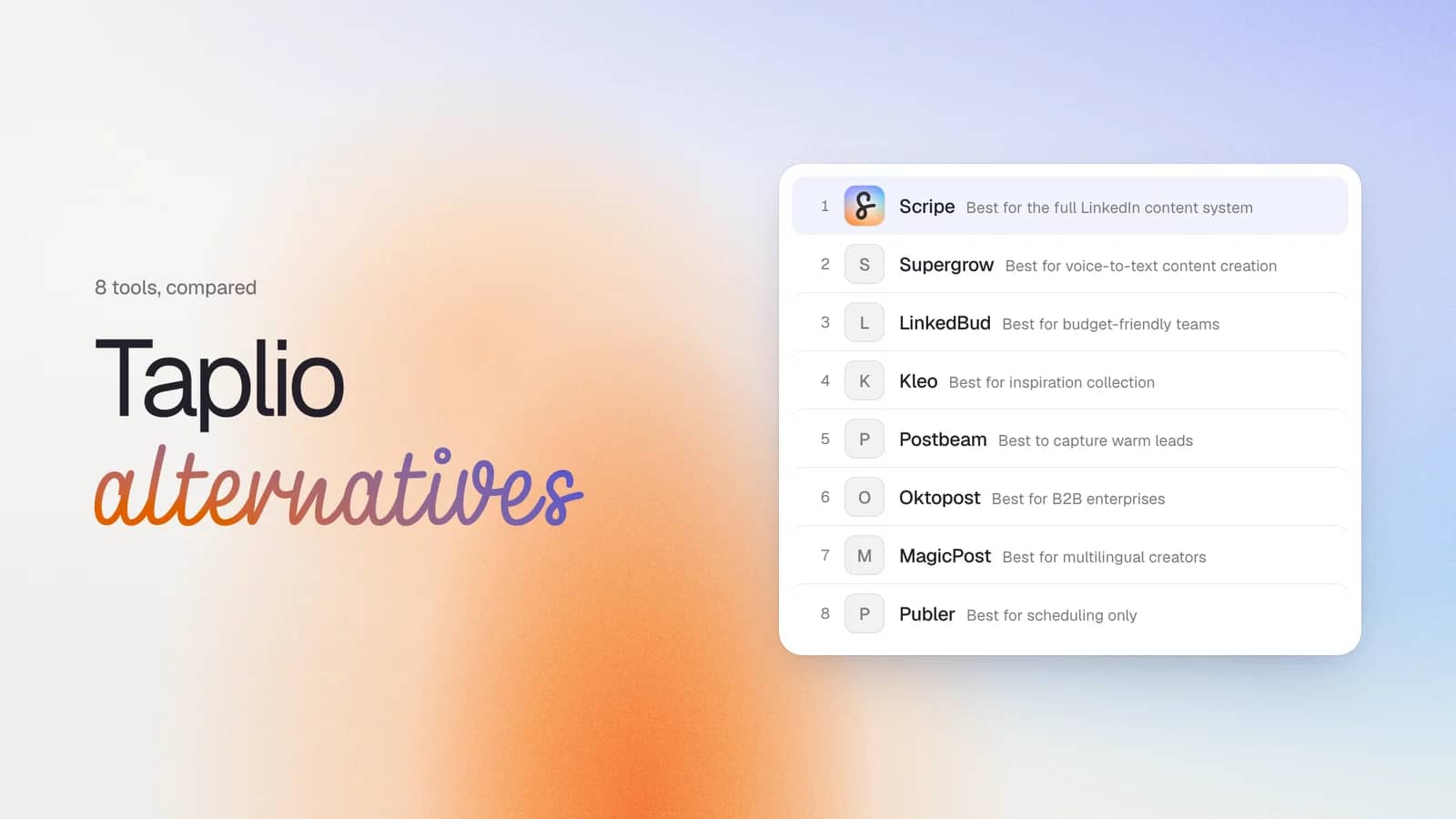
| Tool | Best for | Starting price | Depth of operations | LinkedIn Compliance | Standout feature |
|---|---|---|---|---|---|
| Scripe | Complete LinkedIn content system | $79/mo | Very High | Yes | Voice-trained AI, Knowledge Base, approval workflows |
| Supergrow | Voice-to-text content creation | $19/mo | Medium | Yes | PostCast interviews that produce a week of drafts |
| LinkedBud | Budget-friendly idea generation | $10/mo | Medium | Yes | AI-powered RSS and news monitoring for post ideas |
| Kleo | Inspiration collection and reuse | $99/mo | Medium | Yes | Swipe file with AI writing built around saved content |
| Postbeam | Capturing warm leads from posts | $49/mo | High | Yes | ICP-filtered warm lead detection with intent scoring |
| Oktopost | Enterprise B2B marketing teams | Custom | Enterprise | Yes | CRM integrations, employee advocacy, revenue attribution |
| MagicPost | Multilingual creators and agencies | $35/mo | High | Yes | AI writing in 7 languages, white-label client reporting |
| Publer | Reliable multi-platform scheduling | Free | Medium | Yes | Affordable scheduling with RSS automation and post recycling |
#1 Scripe: Best for the full LinkedIn content system
Full disclosure: I participated in building Scripe. I've included it on this list because it's the answer to some Taplio's limitations, but you should weigh that context when reading this section.
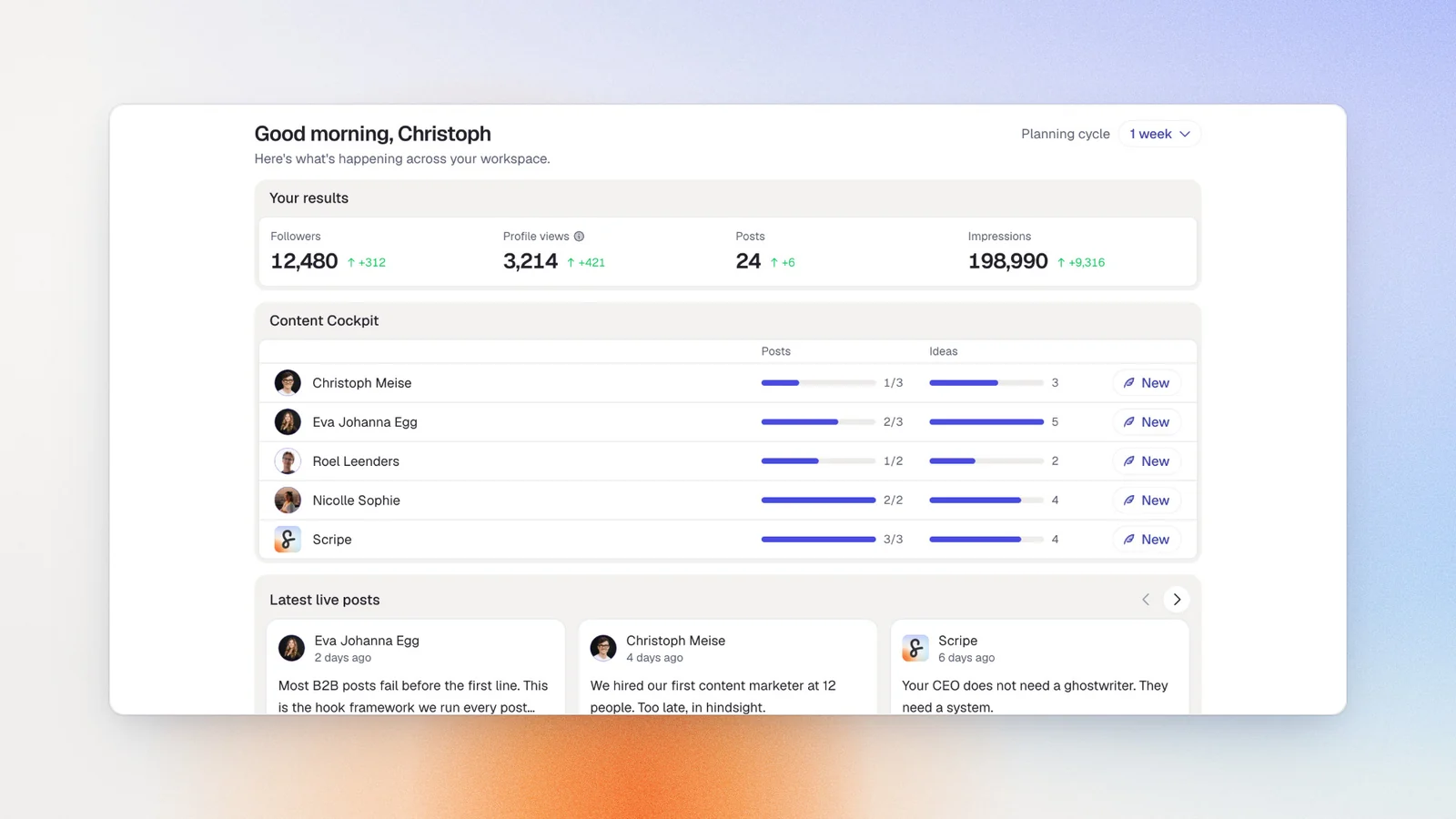
Scripe manages the entire LinkedIn content lifecycle. The distinction matters: Taplio solves the "what do I write now" problem; Scripe solves the "how do I consistently produce content that sounds like me, gets approved, gets published, and gets measured" problem. That's the Scripe Method, system designed to run your LinkedIn presence rather than assist with isolated posts.
Input can come from voice memos, WhatsApp messages, YouTube links, uploaded documents, or URLs. The mobile app gives full access to every feature on the go, so ideas captured mid-commute can become approved posts the same day.
Key features
- Tone of Voice Engine: Four AI Chat Modes (Guided, Ideation, Interview, Source) that draft in your voice, not a generic model
- Knowledge Base: Learns from documents up to 2GB, websites auto-rescanned every 7 days, Notion pages, and YouTube transcripts
- WhatsApp integration: Voice memo to post draft in seconds
- Approval workflows: Five role levels, post statuses, and multi-step chains — configured in-product, no setup cost
- Analytics: Impressions, earned media value (configurable currency), engagement rate, follower growth, content library with CSV export, 3D Activity Visualization, Team Leaderboard, Company Page Analytics
- Isolated workspaces: Separate environments per client or brand, accessible on web, iOS, and desktop
Pricing
If paid monthly
- Solo: $79/mo
- Advanced: $114/mo (unlocks unlimited users)
- Business: $170/mo
If paid yearly
- Solo: $63/mo
- Advanced: $90/mo (unlocks unlimited users)
- Business: $136/mo
All plans include a 7-day free trial.
Good fit for
- Founders and executives who capture ideas instead of starting from a blank page.
- Agencies managing multiple client accounts with separate voice profiles.
- Sales leaders using LinkedIn for lead generation.
Not a good fit for
- Solo creators who only need basic LinkedIn features and can write everything themselves
- Enterprise organizations with 50+ users that need deep CRM integrations
LinkedIn compliance
Scripe publishes through LinkedIn’s official API. No browser cookies or Chrome extensions are required.
AI personalization level
High. Scripe builds a persistent voice profile from your past posts and your Knowledge Base — product documents, case studies, URLs, transcripts. Every draft references both. The output sharpens the longer you use it: the AI learns your sentence patterns, your content pillars, and your audience's responses. You're editing drafts, not rewriting generic output.
Build your LinkedIn Content System
Try Scripe for Free#2 Supergrow: Best for voice-to-text content creation
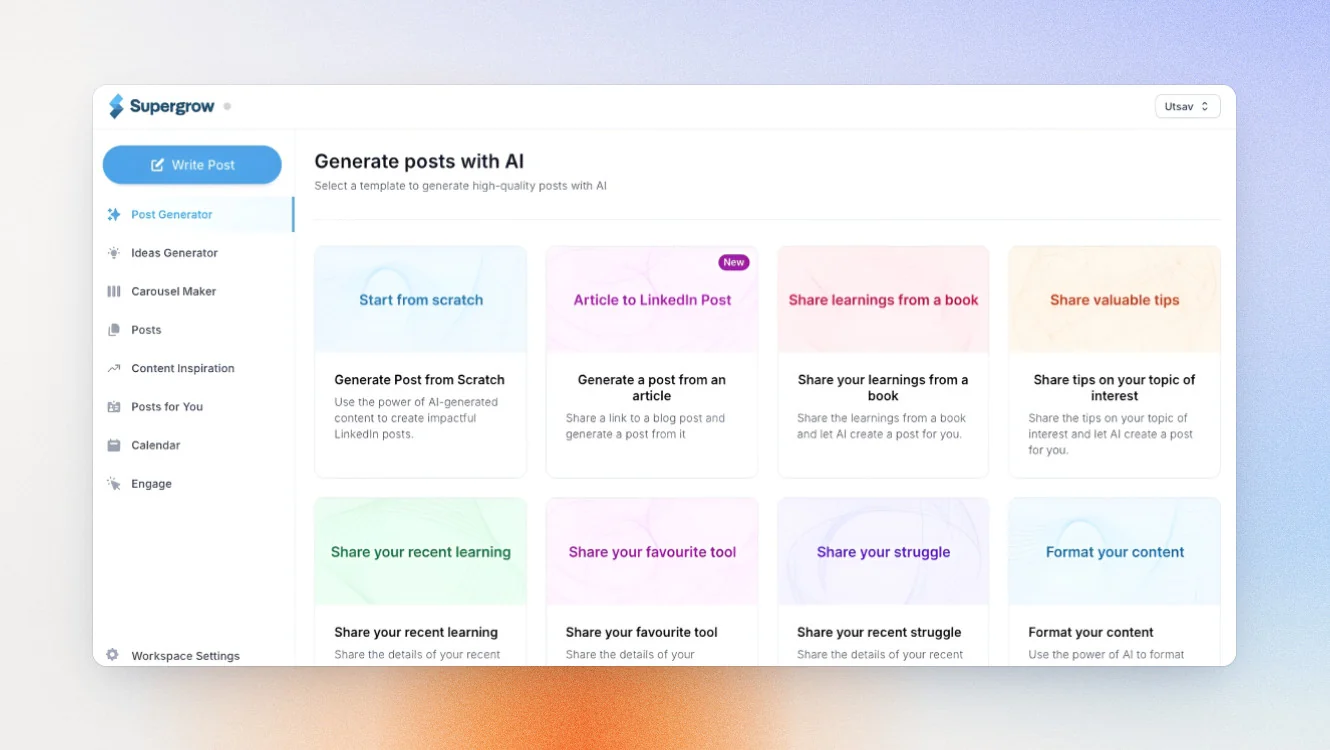
If writing slows you down but talking doesn’t, Supergrow is a strong alternative to Taplio.
Supergrow's headline feature is PostCast – a structured 10–15 minute AI interview that turns your spoken answers into a week's worth of LinkedIn post drafts. It's a strong fit for founders and consultants who are articulate in conversation but stall in front of a blank text field.
Key features
- PostCast voice interview — spoken conversation becomes multiple post drafts
- Content DNA per user — separate AI voice model per account
- Approval workflows and multi-step publishing
- Weekly performance briefing via Slack or email
Pricing
If paid monthly
- Starter: $19/mo
- Pro: $39/mo
- Teams: $139/mo (up to four executives)
- Enterprise: Custom
If paid yearly
- Starter: $16/mo
- Pro: $31/mo
- Teams: $133/mo (up to four executives)
- Enterprise: Custom
Free trial is available.
Good fit for
- Founders and consultants who think out loud
- LinkedIn creators who prefer conversation over prompts
- Professionals who want faster AI writing without losing their writing style
Not a good fit for
- Anyone who needs basic analytics on the Starter plan
- High-volume creators who need unlimited voice sessions
- Agencies managing multiple client accounts
LinkedIn compliance
Supergrow publishes through LinkedIn’s official API without browser cookies or Chrome extension automation.
AI personalization level
Good. Supergrow builds AI output from your spoken ideas instead of a blank prompt. The results feel more natural, although its voice learning isn’t as deep as platforms built around a long-term knowledge base.
#3 LinkedBud: Best for budget-friendly teams
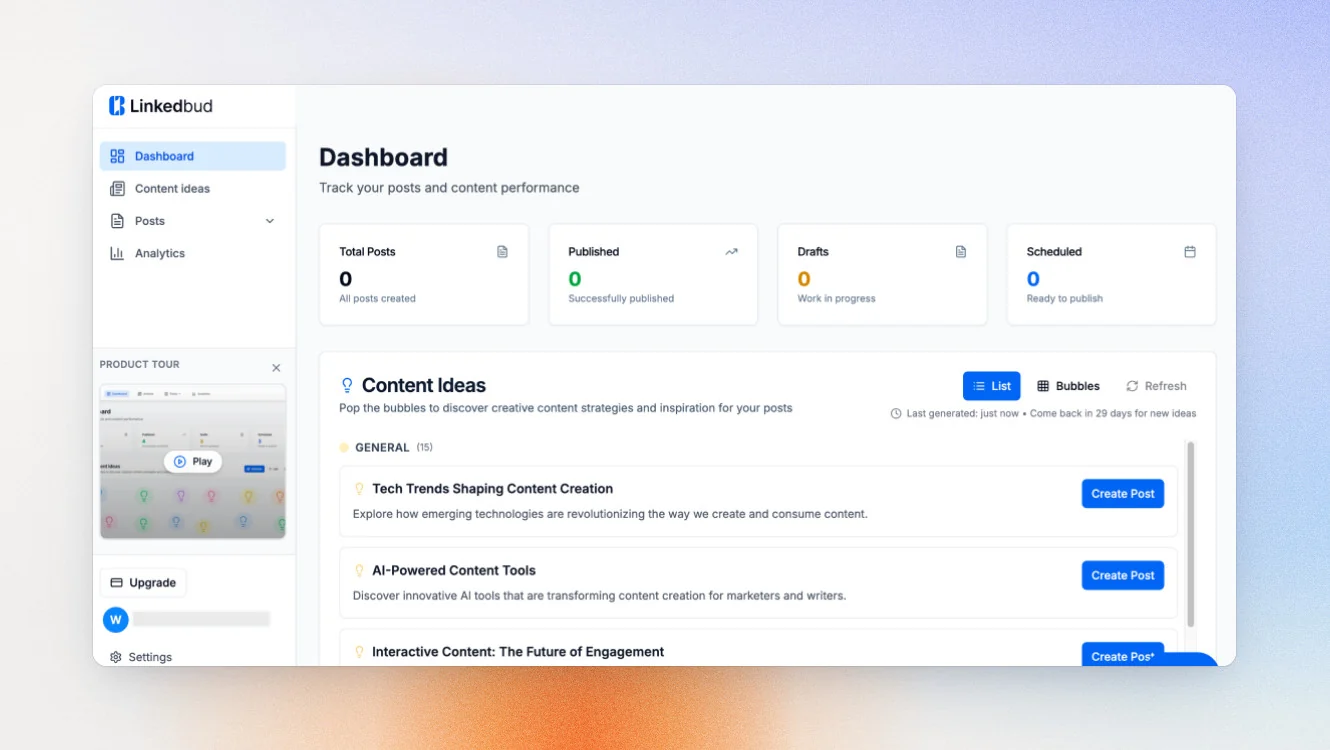
If finding content ideas takes longer than writing, LinkedBud is worth a look. It’s one of the newest Taplio alternatives and one of the most affordable, with Creator Pro starting at €14.25/month when billed annually.
Its biggest strength is content discovery. LinkedBud monitors RSS feeds, Google News, and your sources, then turns them into multiple post ideas, so you’re never starting from a blank page
Key features
- RSS and Google News monitoring with AI post idea generation (up to 15 variants per article)
- Bubble board for organizing and editing post ideas
- LinkedIn scheduling via official API
- Team collaboration on shared content
Pricing
If paid monthly
- Free plan
- Creator Lite: $10/mo
- Creator Pro: $22/user/mo
- Growth: $113/user/mo
If paid yearly
- Free plan
- Creator Lite: $7.70/mo
- Creator Pro: $16.20/user/mo
- Growth: $84.80/user/mo
Free trial is available.
Good fit for
- Teams that need more content ideas
- Creators who want affordable AI writing
- Budget-conscious agencies managing multiple client accounts
Not a good fit for
- Users who need advanced analytics
- Creators who want deep voice learning
- Businesses needing a complete LinkedIn strategy platform
LinkedIn compliance
LinkedBud is a LinkedIn Verified App that publishes through LinkedIn’s official API, without browser cookies or Chrome extension automation.
AI personalization level
Moderate.
LinkedBud supports voice-trained AI writing, but its biggest strength is content discovery. If running out of ideas is your biggest problem, it’s one of the strongest AI content creation tools on this list.
#4 Kleo: Best for inspiration collection
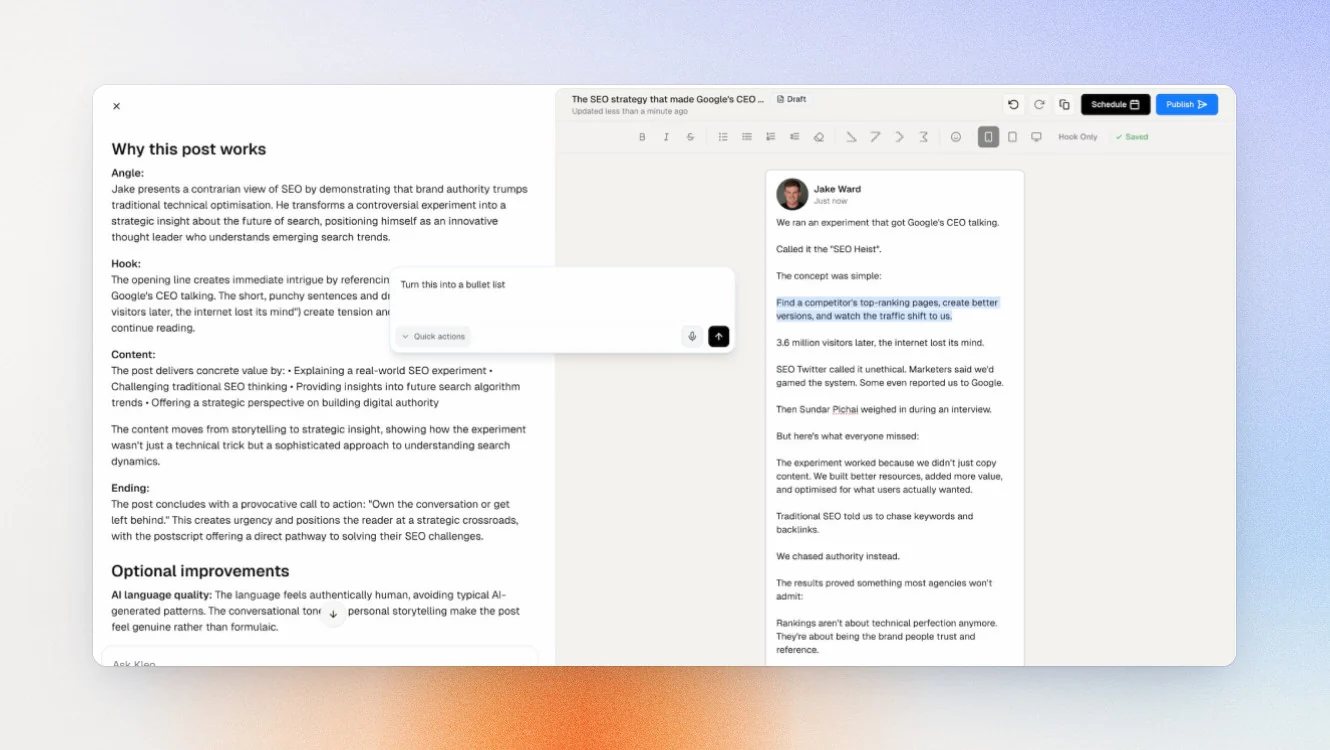
If your best ideas come from other people’s content, Kleo gives you one place to save and organize it.
Kleo's standout feature is its swipe file — a structured system for saving LinkedIn posts and external content you find compelling, then turning that saved library into new post ideas and drafts.
Key features
- Chrome extension for saving LinkedIn posts and inspiration directly while browsing
- AI writing with voice learning from saved content and past posts
- Knowledge base built from your swipe file and uploaded material
- Content editor and post creation tool
Pricing
- Standard: $99/mo
- Annual: $999/yr
Good fit for
- A creator who regularly saves posts they admire but never converts them into actual content — and wants an AI layer on top of that saved library
- A founder building a personal brand who uses competitive research as a content input
Not a good fit for
- Teams that need multi-account management, approval workflows, or agency-level reporting
- Anyone prioritizing LinkedIn analytics — this isn't Kleo's focus
LinkedIn compliance
Kleo uses a Chrome extension for browsing and saving inspiration. It does not automate posting actions on your LinkedIn account — publishing is user-initiated. It is not listed as an official LinkedIn API partner.
AI personalization level
Good. Kleo builds its AI context from your swipe file, past posts, and uploaded knowledge base. The more content you save, the more grounded its suggestions become in what you find compelling.
#5 Postbeam: Best to capture warm leads
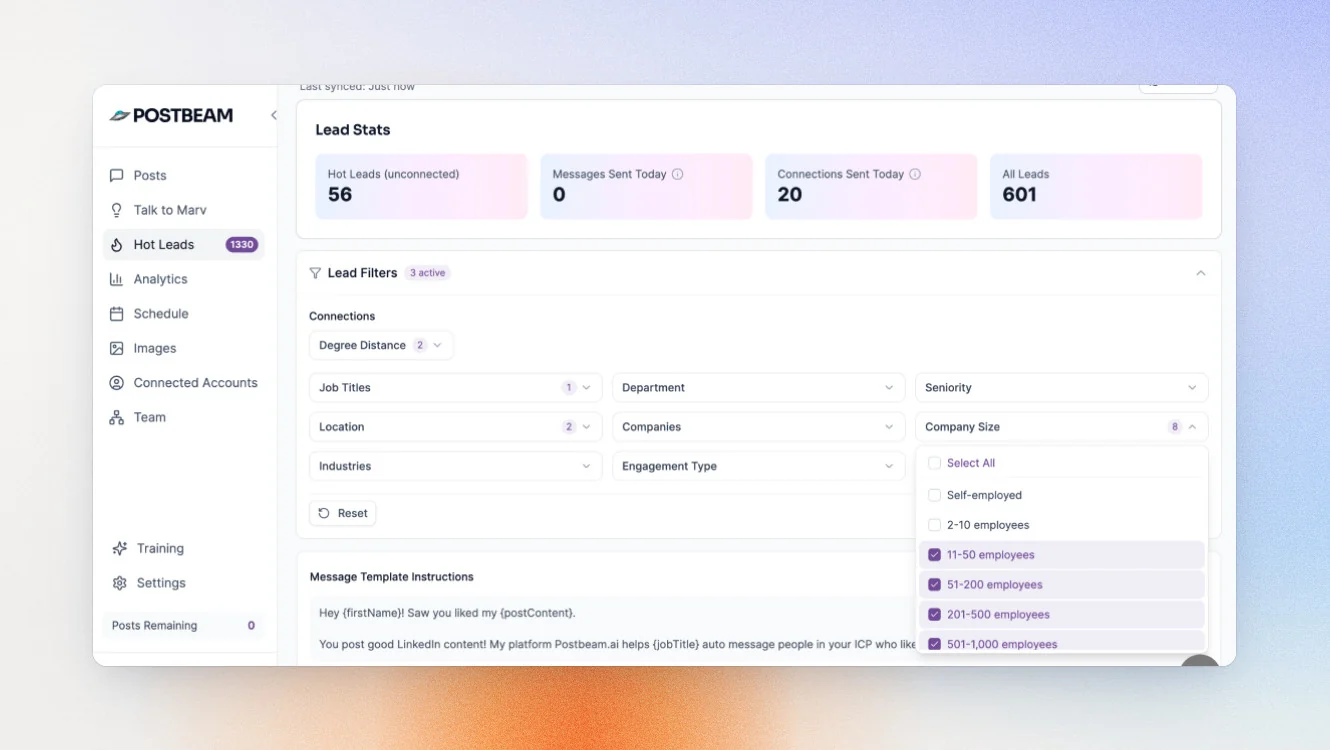
If you use LinkedIn for lead generation, Postbeam takes a different approach from most Taplio alternatives.
Its standout feature is warm lead detection. After a post goes live, it identifies every person who engaged — filtered against your ICP by job title, seniority, company size, and industry — scores them by intent, and surfaces pre-drafted outreach messages referencing the exact post each person interacted with. Unlike Taplio Pro's bulk DM and connection automation (which operates in session-cookie territory), Postbeam uses compliant official partner APIs throughout.
Key features
- ICP-filtered engagement capture across all team posts
- Intent scoring per engaged account with ranked warm lead lists
- Pre-drafted outreach messages referencing the specific post each prospect engaged with
- CRM export to HubSpot, Salesforce, or CSV
Pricing
If paid monthly
- Solo: $99/mo
- Team: $99/mo per user (two-user minimum)
- Done for you: $499/mo per user
If paid monthly
- Solo: $470/year
- Team: $374/year per user (two-user minimum)
- Done for you: $499/mo per user
A 7-day free trial is available on both plans.
Good fit for
- A founder or sales leader who treats LinkedIn posts as a top-of-funnel channel and needs a systematic way to turn post engagement into outbound conversations
- A GTM team that needs to show LinkedIn's contribution to pipeline, not just engagement metrics
Not a good fit for
- Creators focused on building audience or personal brand — Postbeam is revenue intelligence, not a publishing or analytics platform
- Agencies managing multiple client content accounts with approval workflows
LinkedIn compliance
Official LinkedIn partner API. No browser automation, no cookie-based session access.
AI personalization level
Moderate. Postbeam's AI focuses on prospect identification and message personalization rather than content generation. If lead intelligence matters more than writing assistance, that trade-off works in its favor.
#6 Oktopost: Best for B2B enterprises
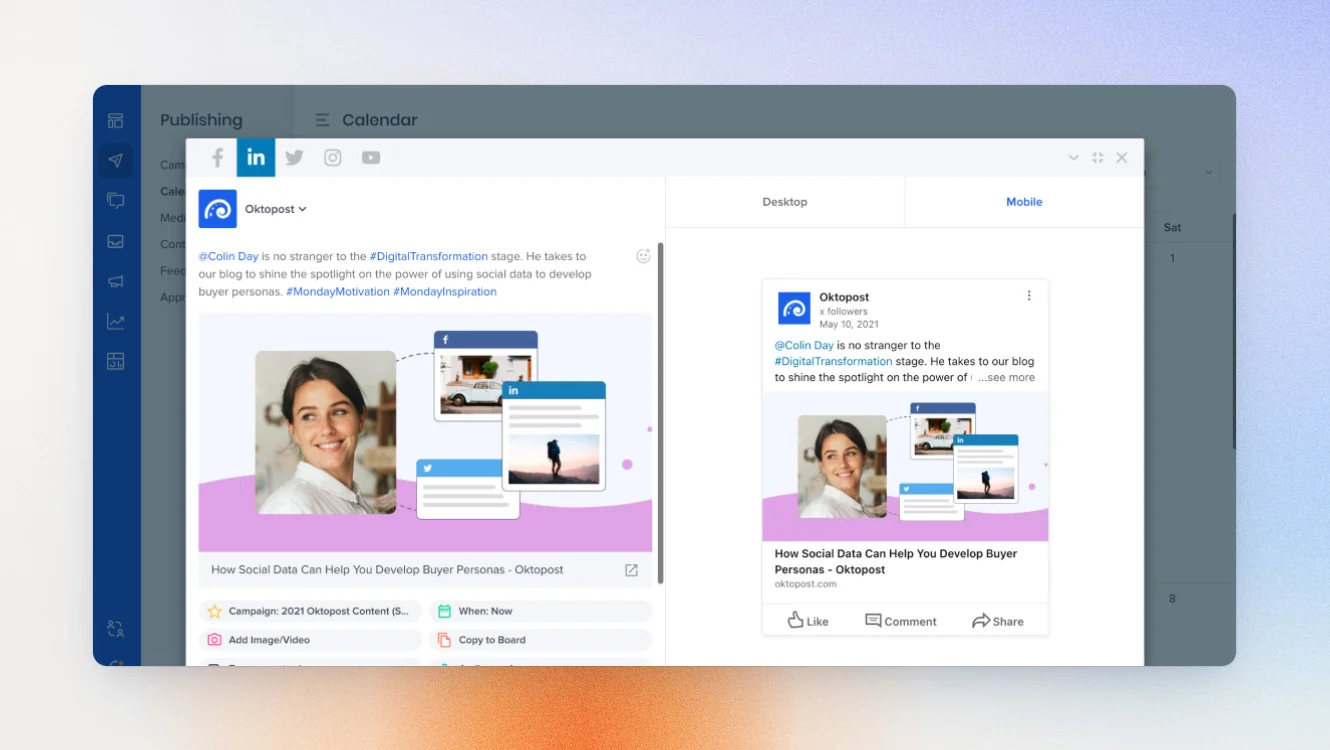
If you’re buying for a marketing team rather than yourself, Oktopost belongs on your shortlist. Unlike the other Taplio alternatives in this guide, it’s built for enterprise B2B companies that connect LinkedIn activity to pipeline and revenue.
Its biggest strength is combining publishing, employee advocacy, CRM integrations, and advanced analytics in one platform.
Key features
- Employee advocacy module with AI-powered content creation and per-advocate voice profiles
- Two-way CRM sync with Salesforce, Marketo, HubSpot, Eloqua, Pardot, and Microsoft Dynamics 365
- Agent Builder: a no-code canvas for automating approvals, analytics summaries, and inbound triage
- Social listening across multiple platforms
Good fit for
- B2B marketing teams
- Companies running employee advocacy programs
- Businesses that need CRM-linked analytics
Not a good fit for
- Solo creators building a personal brand
- Freelancers who prioritize AI writing
- Small businesses looking for a low-cost tool
LinkedIn compliance
Oktopost is a certified LinkedIn B2B Marketing Partner with access to LinkedIn’s Profile Analytics API.
AI personalization level
Moderate. Oktopost uses AI for content creation and employee advocacy. Its focus is enterprise collaboration and reporting rather than deep voice learning.
#7 MagicPost: Best for multilingual creators
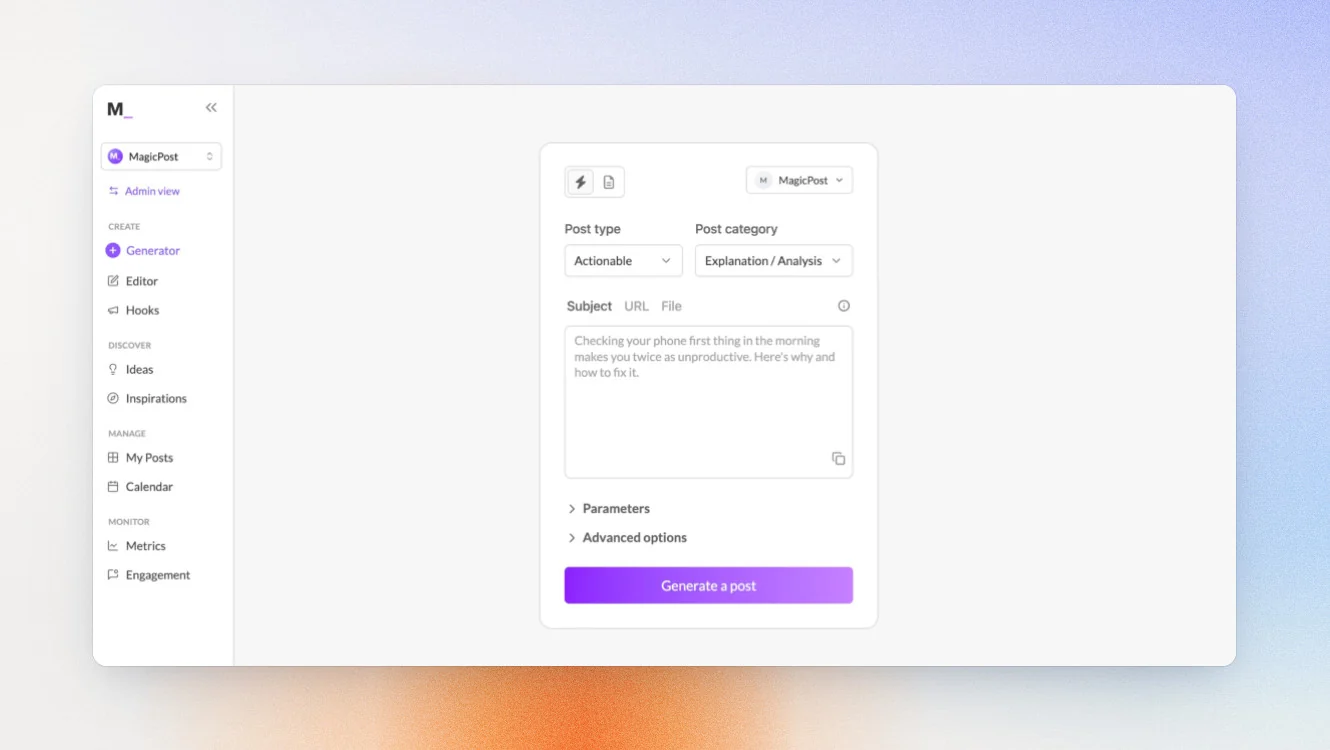
If you create LinkedIn content in multiple languages, MagicPost is one of the strongest Taplio alternatives. It supports AI writing in seven languages and is a great fit for international creators.
MagicPost combines AI writing, scheduling, and LinkedIn analytics in one platform, and as a LinkedIn-verified partner, it offers a safer publishing workflow than browser-based automation.
Key features
- AI post generation in 7 languages
- Analytics suite: impressions, follower growth, audience demographics, post performance benchmarking
- White-label client reports with custom branding
- Inspiration Library of 2M+ posts filterable by topic and engagement
- Official LinkedIn API scheduling
Pricing
If paid monthly
- Analytics: $35/month
- Creator: $69/month
- Teams: custom
If paid yearly
- Analytics: $21/month
- Creator: $39/month
- Teams: custom
Free Trial is available in all plans.
Good fit for
- Creators publishing in multiple languages
- Agencies supporting international clients
- Teams that want AI writing and analytics in one platform
Not a good fit for
- Users looking for a free plan
- Businesses needing deep CRM integrations
- Creators focused only on AI writing
LinkedIn compliance
MagicPost is a LinkedIn-verified partner that uses LinkedIn’s official APIs for publishing and analytics.
AI personalization level
Good. MagicPost learns from your writing style and existing content to improve AI output over time, making it a strong choice for multilingual creators.
#8 Publer: Best for scheduling only
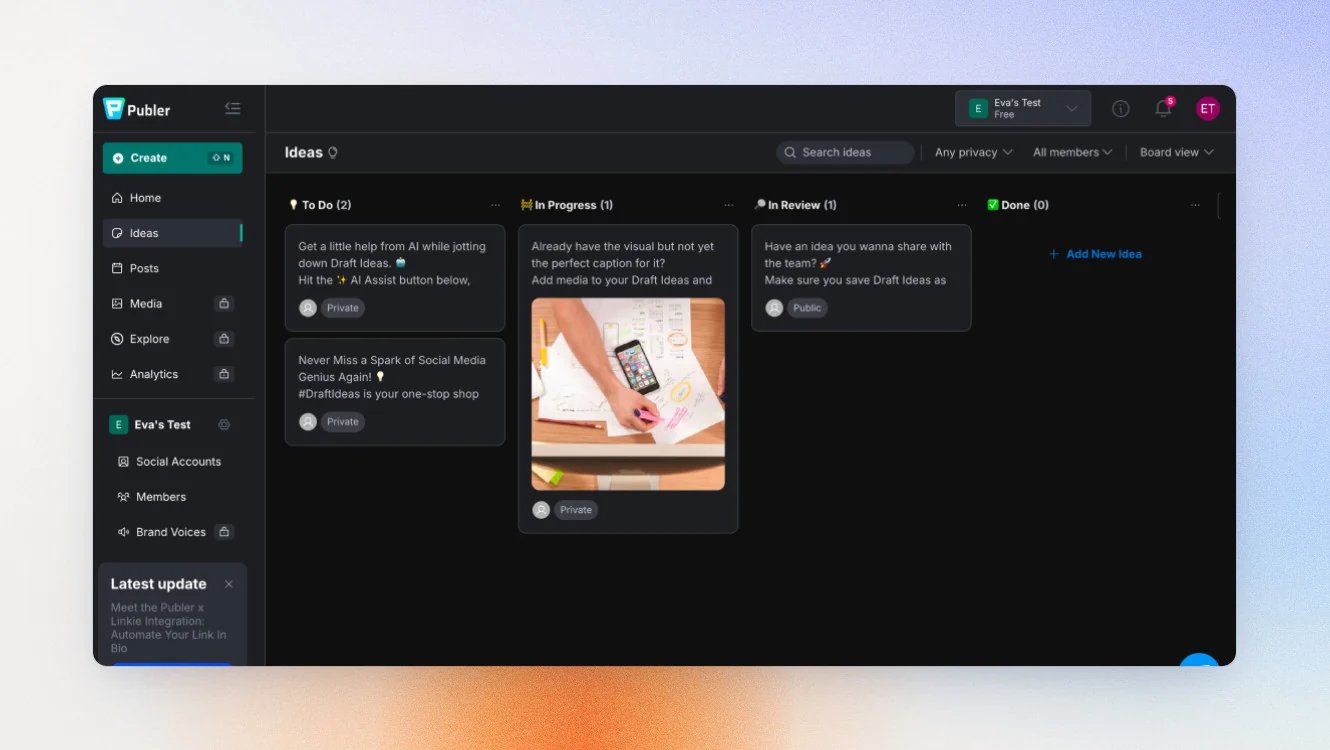
If you mainly need a reliable scheduler, Publer is a solid alternative to Taplio. It focuses on planning, publishing, and analyzing social media posts across multiple platforms at an affordable price.
Its biggest strengths are scheduling, RSS automations, and post recycling, making it a great fit if your AI needs are simple.
Key features
- Multi-platform scheduling with visual calendar
- RSS feeds and trending news integration for content automation
- Post recycling — republish evergreen content on a set schedule
- AI caption generation (basic)
Pricing
If paid monthly
- Free: €0/mo
- Professional: €4.39/mo
- Business: €8.79/mo
- Enterprise: Custom
If paid yearlly
- Free: €0/mo
- Professional: €3.51/mo
- Business: €7.02/mo
- Enterprise: Custom
Free trial is available.
Good fit for
- Creators who already have content ideas
- Teams managing multiple platforms
- Businesses looking for affordable scheduling
Not a good fit for
- Users who want advanced AI writing
- Founders wanting a complete LinkedIn content system
- Agencies managing multiple client accounts
LinkedIn compliance
Publer supports publishing to LinkedIn profiles and company pages but doesn’t publicly state that it uses LinkedIn’s official API or is a LinkedIn partner.
AI personalization level
Basic. Publer includes AI features, but its strength is scheduling and publishing rather than advanced AI content creation.
How to choose the best Taplio alternative
| If your biggest challenge is… | Choose… | Why |
|---|---|---|
| You want one complete LinkedIn system | Scripe | Combines strategy, AI writing, analytics, collaboration, and publishing in one place. |
| You never know what to post | LinkedBud | Finds fresh content ideas from news, RSS feeds, and your industry. |
| You think better by talking | Supergrow | PostCast turns conversations into LinkedIn posts. |
| You collect inspiration but never use it | Kleo | Saves posts and turns them into new content. |
| You want LinkedIn to generate warm leads | Postbeam | Identifies engaged prospects and buying signals. |
| You publish in multiple languages | MagicPost | AI writing supports seven languages. |
| You manage marketing for a large B2B company | Oktopost | Enterprise platform with CRM integrations and advanced analytics. |
| You mainly need scheduling | Publer | Affordable scheduling across multiple platforms. |
How to migrate from Taplio
Switching to one of these Taplio alternatives usually takes a couple of hours, not a whole weekend. Here’s the checklist I’d follow.
1. Export everything you want to keep
Before you cancel Taplio, save:
- Your top-performing LinkedIn posts
- Unpublished drafts and post ideas
- Your LinkedIn analytics, if available
- Any saved content ideas or notes
You don’t want to discover later that something important is gone.
2. Keep what’s already working
Your new tool shouldn’t reset your progress.
Make a note of:
- How often you publish LinkedIn posts
- Which formats perform best
- The topics your audience responds to
- The content strategy you want to keep
That gives you a much better starting point.
3. Set up your new tool first
Connect your LinkedIn account, import your writing style if supported, add your existing content, and organize your content ideas before generating anything new.
Spending an extra 20 minutes here will save you hours later.
4. Cancel when you’re ready
Check your billing date before you cancel.
I’d export everything and set up my new workspace first. There’s no benefit to rushing if you still have time left on your subscription.
That’s it.
Switching tools usually feels like a bigger job than it really is.
5 Reasons people choose Scripe
You’ve seen tools on this list that solve one problem really well. That’s valuable. But it’s also why many people end up paying for multiple tools at once.
We built Scripe differently.
We didn’t want Scripe to be another tool you had to fit into your workflow. We wanted it to improve the workflow itself.
Here’s how you can keep things simple without giving anything up.
1. Capture ideas before they’re gone
The best LinkedIn posts rarely start with a prompt.
They start with:
- a conversation
- a client call
- a voice memo
- something you noticed during the day
Scripe lets you save voice notes, documents, URLs, YouTube videos, and quick thoughts, then turns them into content ideas you can actually use.
2. Stay in your own voice
The goal isn’t to sound like AI.
Your writing style, positioning, knowledge base, and previous LinkedIn posts become part of your workspace. The more you use Scripe, the better the AI understands how you write, so you’re editing ideas instead of rewriting AI output.
3. Replace your Frankenstein workflow
Most creators who want to grow on LinkedIn end up juggling multiple LinkedIn tools.
With Scripe, everything lives in one place:
- Content calendar
- AI writing and image creation
- Publishing
- Analytics
- Approvals and collaboration
What our customers say
“Scripe makes content easier. It saves time. It gets you more reach. And it’s built for teams to collaborate easily.”
4. Turn LinkedIn into a predictable growth channel
Publishing is only half the job.
Scripe’s LinkedIn analytics help you understand which LinkedIn posts drive conversations, inbound opportunities, and long-term LinkedIn growth, so your content strategy keeps getting better.
What customers say
“At this point, +80% of our deals are influenced by LinkedIn. People already trust us before we ever talk to them.”
5. Scale your team’s personal brands
Growing one LinkedIn account is one challenge. Growing an entire team is another.
Each person gets their voice, workspace, and strategy, while managers can review posts, manage approvals, and see what’s working across multiple client accounts or internal teams.
What our customers say
“I think Scripe is for all types of teams. I mean, it can be great for C-level. But for sales and marketing, it’s a super great lead gen and awareness machine.”
By now, you probably have a good idea whether Scripe is the right fit for you. The only way to know for sure is to use it.
The only way to know for sure is to use it.
Try Scripe for FreeFAQs

Co-Founder & CTO
Christoph Meise is Co-Founder and CTO at Scripe, where he leads engineering and product development with a focus on building intuitive, high-performing user experiences. With over a decade of engineering experience at multiple companies he combines deep technical expertise with a strong instinct for how technology should actually feel to use. His academic foundation, a Master of Science in Business Informatics from Freie Universität Berlin and a Bachelor of Applied Science in Computer Science from Baden-Wuerttemberg Cooperative State University (DHBW), grounds his engineering approach. He previously co-founded and architected an online platform connecting entrepreneurs with investors, sharpening his focus on building systems that serve real user needs end to end. At Scripe, Christoph has led the product through multiple rebuilds, including a shift to become an official LinkedIn API partner and the launch of a self-learning content agent, work centered on making powerful technology feel effortless for the people using it. Christoph shares his perspective on LinkedIn growth, product development, and building with AI to a following of over 11,000 on LinkedIn.
LinkedIn